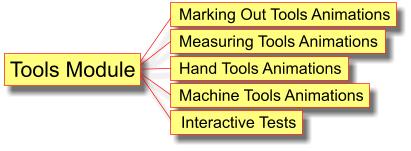
The Hand Tools Animation package has been combined with the Measuring and Making Out and the Machine Tools packages to form a new comprehensive and cost effective Tools Module.
Single User Licence - £20 / School Site Licence - £40 |
The hand tools animation section of the new Tools Module consists of:
- planes:
- jointer plane
- jack plane
- smoothing plane
- bench plane sizes
- plane parts
- sharpening angles for plane cutting irons
- grinding and honing
- frog angles
- rebate plane
- marking out a rebate
- planing a rebate
- shoulder plane
- bull nose plane
- spokeshaves
- wood chisels:
- firmer chisel
- bevel edged chisel
- mortice chisel
- using a mortice chisel
- gouge
- cold chisel
- tinsnips and shears
- using tinsnips
- saws for wood:
- tenon saw
- dovetail saw
- cross cut saw
- rip saw
- coping saw
- hacksaw
- junior hacksaw
- abra file
- hammers and mallets:
- engineer's ball pein hammer
- sledge hammer
- rubber mallet
- plastic faced hammers
- soft faced hammers
- rawhide mallet
- bossing mallet
- raising hammer
- planishing hammer
- doming hammer
- cross pein hammer
- claw hammer
- woodworker's mallet
- files:
- description
- roughness of cut
- hand file
- flat file
- half round file
- round file
- square file
- three square file
- knife file
- needle files
- Swiss wax files
- drills:
- brace and bit
- how to use a brace and bit
- twist drills
- countersink
- riveting with countersunk head rivets
- hand drill / wheel brace
- Taps and dies:
- taps and tap wrench
- tapping a thread
- die and diestock
- cutting an external thread
- drunken threads.
Interactive Test
To complement the hand tools animations, the new Tools Module has an interactive test that helps students learn the names of 50 commonly used D&T hand tools.
View the demo interactive test here.
Learning Objectives
By working through the hand tools section of the Tools Module, students will learn:
- the names of the hand tools used to cut and shape resistant materials
- what the various hand tools are used for
- to choose the correct hand tool for any given cutting and shaping operation
The Tools Module is suitable for Key Stage 3 and Key Stage 4 students.
Order the Tools Module
Single User Licence - £30 / School Site Licence - £60 |
Download links will be emailed to you/your school within 24 hours of receipt of your order.
Tools Module formats
The Tools Module is supplied in either:
- Windows installer version. This is the most commonly used format for use with computers and computer networks.
- File format for use with Apple Macs. (See information about using our software with Apple Macs)
Add Extra Modules to the Tools Module software
Buying a licence for our software bundles is much more economical than licencing individual software packages.
Click here to view details of our other software packages and economical software bundles.